Muffinresearch Labs by Stuart Colville

CSS Sprite Generator Tool | Comments (9)

Posted in Code on 27th September 2007, 10:50 pm by Stuart

Website Performance - CSS Sprite Generator

ENS ANNOUNCEMENTS and lfolks blog Excel Equipment and Supply Blog visit endel.ovh.org or Arbourthorne Community Church

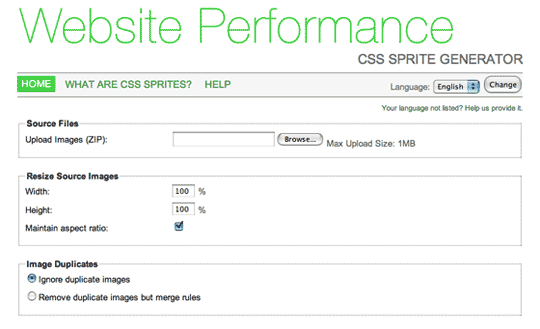
Ed and I have been busy putting the final touches on our CSS Sprite creation tool which is now available over at http://spritegen.website-performance.org

For the uninitiated, a CSS Sprite is a single image file which contains several graphics. Using CSS background positions it’s possible to display any one of the graphics. By using a sprite you save on multiple http requests which helps speed up the rendering of your page.

The tool allows you to upload a zip of images which the script then concatenates into one image to be used as a CSS Sprite. The CSS offsets for each image are created and output and class-names for each image in the sprite can be generated from the filenames of each of the original images. In fact this approach is recommended.

A feature I’m really pleased with is the ability to screen out duplicate images, and either ignore them or have the classes merged to point to the same graphic. This is achieved through comparison of MD5 hashes of all of the uploaded files.

This is the first tool that we’ve launched through http://website-performance.org and we will be providing many more interesting tools related to web-site performance in due course. Both Ed and I are currently writing a book for Apress that will be being published in early 2008, and this site will serve as a place for all of the related materials so there’s lots more exciting stuff to come in the near future.

For now get over to http://spritegen.website-performance.org; have at it, and let us know what you think.

Post Tools

Comments: Add yours

1. On September 28th, 2007 at 9:07 am Ian Lloyd said:

Stuart, Ed,

This is an excellent idea and one that I will use for sure. Admittedly it will be one that I use infrequently and for a brief moment in time - but I’m sure that’s the same for all users: get in, do the job, take the swag!

I know that you have provided help for the options on the site, but I’d be inclined to have it more inline. For example, talking about vertical and horizontal offset, it’d benefit from a mini graphic of some kind - perhaps appears when you hover over/focus on a thumbnail - to demonstrate visually what you mean. I was confused by the transparency part too (specifically the checkbox for ‘Use Background Colour for Transparency’ - wasn’t sure how that related to the field above).

Now I’m just looking forward to the next time that I have to create something using this technique :)

2. On September 28th, 2007 at 1:19 pm Stuart Colville said:

@Ian: Thanks for your comments. You’ve made some great points about the interface, and we are certainly thinking that some of the options do need better explanation and in some cases some options can be hidden away as advanced options.

No doubt we will look to make some updates based on your suggestions in the near future.

3. On September 28th, 2007 at 5:15 pm Javascript News » Blog Archive » CSS Sprite Generator Released said:

[...] Stuart Collville and Ed Eliot just launched a new CSS Sprite Generator tool, which is the first of many in a series of web-site performance tools. For the uninitiated, a CSS Sprite is a single image file which contains several graphics. Using CSS background positions it’s possible to display any one of the graphics. By using a sprite you save on multiple http requests which helps speed up the rendering of your page. [...]

4. On September 28th, 2007 at 8:52 pm Nate said:

This will save me a bunch of time as I try to make our site faster and more inline with yahoo’s performance model. Thanks.

5. On October 5th, 2007 at 10:25 am Frances Berriman said:

Hey. Just thought I’d drop by and say we’ve been playing with it a bit at work.

Only problem we’re having is when we’re combining a bunch of gifs, we’re having to get it back as a PNG and then re-save it out as a gif because the quality coming back wasn’t high enough as gif output.

So, it’s helpful to get it back as an image with the CSS positioning worked out for us, but we needed a little more quality control about compression of images.

6. On October 5th, 2007 at 1:13 pm Stuart Colville said:

@frances: Thanks for your feedback, we are looking into providing a fix for this issue shortly.

7. On October 6th, 2007 at 6:51 pm Sammy said:

That’s a nice litte tool. One thing that I find missing is an actual example of the thing, especially on the page “What are CSS sprites”. You explain it with words, and give a link to A list Apart, but this page just begs for an actual visual example of the technique (eg. an actual rollover link, the html, the css). I was aware of this technique before coming to the site, but it might be useful for people who are not.

Thanks.

8. On October 28th, 2007 at 11:50 pm Morethanseven » PHP Asset Packager said:

[...] YAHOO!s performance rules. The recent release of the YSlow extension and another upcoming book from Stuart Colville and Ed Eliot cap things off [...]

9. On April 16th, 2008 at 2:15 pm johanhendrix said:

can anybody point me to a example?
i don’t understand how to implement it..


XHTML: You can use these tags: <a href="" title=""> <abbr title=""> <acronym title=""> <b> <blockquote cite=""> <cite> <code> <del datetime=""> <em> <i> <q cite=""> <strike> <strong>


Standalone mac battery charger|(0)

Got a spare mac battery? I’ve often wondered why up until now no-one’s produced a standalone charger so that you can charge batteries without having to plug them into the mac. Fortunately Fastmac.com have produced a standalone charger that allows you to do just that. and it’s compatible with iBooks, Powerbooks, macbooks and Macbook Pros. It’s also 110/200v. Exactly what I was looking for!

Django Admin Ominigraffle Stencil|(0)

Colleague Alex Lee has created a nice stencil for omingraffle with the Django Admin UI components, perfect for wireframing customised admin screens. For more details and to download the stencil see Alex’s Blog csensedesign.co.uk

Photos on Flickr

© Copyright 2004-08 Stuart Colville, all rights reserved. May contain traces of Muffin. Powered by WordPress. Hosting by 1&1 This page was baked in 1.008s.