Muffinresearch Labs by Stuart Colville

Use Tabs in Textmate for Files Opened Via Transmit | 62 Comments

Posted in Software on 13th June 2006, 9:30 am by

UPDATE: For opening tabs in transmit 4 see comment #49

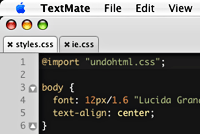
Screenshot showing tabs in textmate

I really love TextMate. Everything about it oozes productivity. The only thing that I could say I didn’t like was that there was no way to edit remote files in textmate (opened via transmit) using the tabs. That is up until now.

Tabs in TextMate are only available when you are using the projects feature. Opening a file with textmate by default opens in a single window. Thus if you use Transmit and set Textmate as your default editor every file you open via transmit will open in a separate window. This is fine but if you are working on a large project switching back and forth between windows fast becomes a pain.

I went onto the textmate IRC channel today and I was asking to see if there was any way round this problem. Someone very kindly pointed me in the direction of this thread on the textmate discussion board: [TxMt] sweet textMate FTP project window goodness!

This thread was posted by Thomas Aylott and details how to open the temporary files in tabs when using CyberDuck and Textmate. Here’s how to carry out the same method with Transmit. Allan Odgaard, the author of TextMate, helped me sort this out so thanks go to Thomas and Allan for making all this possible, I am purely documenting this so that if anyone is looking for how to do this is should be easily found.

The How-to

First off transmit doesn’t use one directory for it’s temporary files so you need to watch the parent folder. You will find this here:

~/Library/Caches/TemporaryItems/Transmit/

aka:

/Users/<your_username>/Library/Caches/TemporaryItems/Transmit/
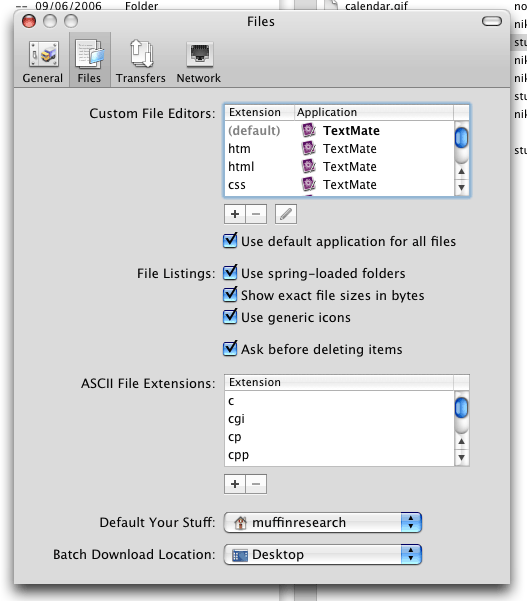
  1. In Transmit set textmate up as the default editor. See screenshot
  2. In TextMate open a new project.
  3. Click on the cog icon in the project drawer and selet “add existing files”. See screenshot
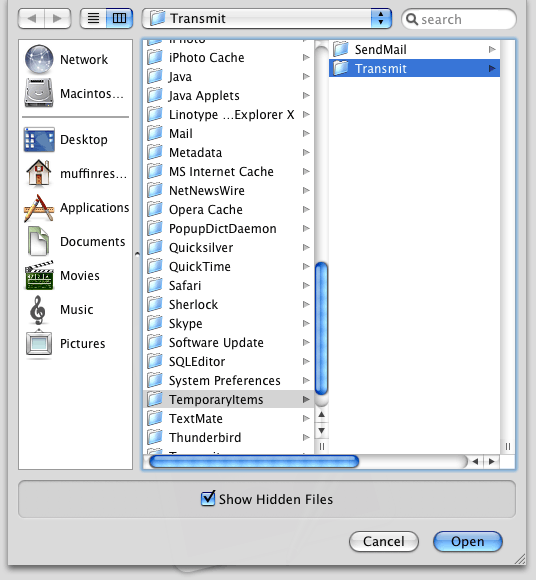
  4. Then find your way to the ‘/Users/<your_username>/Library/Caches/TemporaryItems/Transmit/’ directory as detailed above. Set this as the directory and click ‘open’. See screenshot
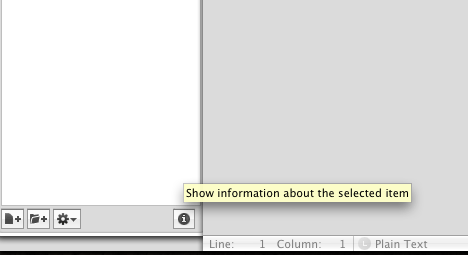
  5. Next select the transmit directory that’s visible in the project drawer and click the info button (i) at the bottom right of the project drawer. See screenshot
  6. Delete everything shown in the ‘folder pattern’ field and close the window. See screenshot
  7. Close the project drawer. You can leave it open if you wish this is a personal preference.
  8. Save the project file! Give a useful name like ‘transmit’. If you don’t save it then this special config will be lost and you will need to repeat these steps.
  9. Lastly open a file directly from transmit and you should see the file open in a tab. See screenshot
There you have it. Next time you want to use this simply open the transmit project file (you did save it right?) and start opening files from transmit and they will be opened straight into tabs.

Post Tools

  • Jonny Nott

    Re: Transmit 4

    The new path is:
    ~/Library/Caches/Cleanup At Startup/Transmit//

  • bonatoc

    Sweeeeeeet !

    Thx a lot.

  • floweht

    was working fine with Transmit 4.1.2, I upgraded to 4.1.3 today and it stopped working. Has anyone experienced the same?

  • y8r

    Just updated to Transmit 4.1.3 and tabs no longer work. Files are still stored in ~/Library/Caches/Cleanup At Startup/Transmit, but they don’t open in the project anymore.

  • http://personman.com Danny

    This isn’t working for me after upgrading to Transmit 4.1.3. I can see the files in the Cleanup At Startup/Transmit folder, but when I open them in Transmit they’re always opening in a new window instead of the tabbed project.

  • Jochen

    Like Danny said, not working after upgrade to 4.1.3.!

    I couldn’t find any proper solution for me. :-(
    (Tried Coda, BBEdit etc.)

    Anybody an idea to fix the problem?
    Thanks

  • Fox

    yeah, mine too.
    Guess it has something to do with “File Pattern” and “Folder Pattern” in Information Window… Any ideas?

  • http://muffinresearch.co.uk Stuart Colville

    Having switched to Ubuntu, I don’t have a mac to diagnose the problem. If anyone finds the solution please post details or a link in the comments and I will update this post.

  • y8r

    From research it seems that panic was fixing some issues for BBEdit/TextWrangler which caused some issues for other editors. It is suppose to be addressed in a newer version. Just updated to to 4.1.4 with no luck. My temporary solution is to download 4.1.2 from panic or visit their archive for other previous versions.

  • Jonny N

    Panic support say: “Indeed, this is no longer working correctly. We may be able to fix this for a future version. In the meantime, we recommend using Transmit Disk as a workaround.”

  • Josh

    Just use the Transmit Disk Feature. It shows your FTP volumes in the finder like any regular disk.

  • Guest

    I don’t know if this is a possibility for you, but if you can access your server using the Terminal (e.g. using ssh), while you’re within the folder you want to open as a project in TextMate, just type “mate .” (provided that you have already installed the “mate” shell command).

Insert a tab character in vim when expand tabs is on|(0)

I have vim set-up to use spaces in place of tabs. Sometimes you need to use an actual tab e.g. editing a Makefile. Now whilst it’s possible to change settings so that tabs are used for specific files, a quick tip to remember is to simply type in insert mode:

Ctrl+v tab

That is Ctrl and “V” and hit the tab key, et voila you’ve entered an actual tab.

GNU screen: open tab in current working directory|(1)

A nice trick for having screen open a new tab in the same directory as the one you’re currently in. To use it add it to your .screenrc

# Open new window in current dir.
bind c stuff "screen -X chdir \$PWD;screen^M"
bind ^c stuff "screen -X chdir \$PWD;screen^M"

Hat tip: mteckert on SuperUser.com

Photos on Flickr

© Copyright 2004-13 Stuart Colville, all rights reserved. May contain traces of Muffin. Powered by WordPress. Hosting by Slicehost.com This page was baked in 0.518s.