Muffinresearch Labs by Stuart Colville

Favicon Generator Launched | Comments (3)

Posted in Code, Software on 10th February 2009, 2:00 am by Stuart

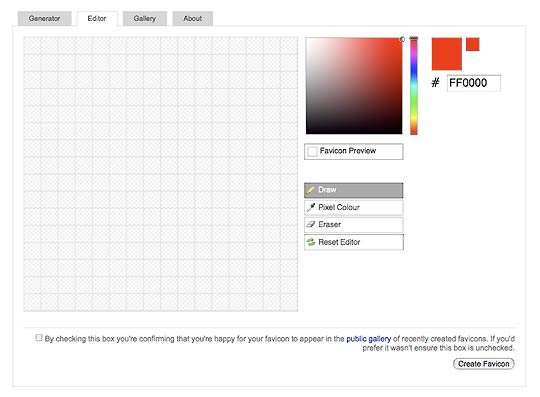
favicon editor

The first of several projects I’ve been working on with former colleagues Ed Eliot and Cyril Doussin is now live as part of Project Fondue, which is a place where we’re collaborating on various projects both as online tools and services as well as open source projects.

The favicon generator is a simple tool to make generating favicons from any graphic a breeze:

Although many modern web browsers support favicons saved as GIFs, PNGs or other popular file formats all versions of Internet Explorer still require favicons to be saved as ICO files (a Microsoft icon format). This tool provides an easy way to convert any GIF, PNG or JPEG to ICO which is supported by all modern web browsers. It also enables you to create favicons from scratch via a handy online editor. Additionally the editor lets you manually tweak generated favicons to ensure the best possible result.

The main difference with the tool is that we’ve provided an editor which allows you to tweak the generated icons which is often necessary particularly if you’re creating a favicon from a much larger graphic.

The Favicon Generator is available at http://favicon-generator.org/

Post Tools

Comments: Add yours

1. On February 10th, 2009 at 2:01 pm Ajaxian » Favicon generator and editor said:

[...] Colville has announced a fun little project that he and fellow collaborators Ed Elliot and Cyril Doussin have worked [...]

2. On February 13th, 2009 at 7:08 pm Shake the Source | Some interesting things said:

[...] Over and over practical http://muffinresearch.co.uk/archives/2009/02/10/favicon-generator-launched/ [...]

3. On April 23rd, 2009 at 3:50 pm Css howto » Favicon generator and editor said:

[...] Colville has announced a fun little project that he and fellow collaborators Ed Elliot and Cyril Doussin have worked [...]


XHTML: You can use these tags: <a href="" title=""> <abbr title=""> <acronym title=""> <b> <blockquote cite=""> <cite> <code> <del datetime=""> <em> <i> <q cite=""> <strike> <strong>


GNU screen: open tab in current working directory|(1)

A nice trick for having screen open a new tab in the same directory as the one you’re currently in. To use it add it to your .screenrc

# Open new window in current dir.
bind c stuff "screen -X chdir \$PWD;screen^M"
bind ^c stuff "screen -X chdir \$PWD;screen^M"

Hat tip: mteckert on SuperUser.com

Ubuntu: add-apt-repository: command not found|(2)

When you’re using a minimal Ubuntu install if you find the ‘add-apt-repository’ command is missing (it’s useful for adding PPAs and other repositories), then simply run:

sudo apt-get install python-software-properties

Photos on Flickr

© Copyright 2004-12 Stuart Colville, all rights reserved. May contain traces of Muffin. Powered by WordPress. Hosting by Slicehost.com This page was baked in 0.492s.