Muffinresearch Labs by Stuart Colville

Bug: IE7 absolutely positioned italics | Comments (23)

Posted in Browsers on 28th December 2006, 5:06 pm by Stuart

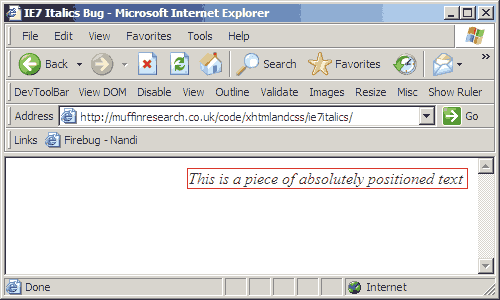
I recently discovered a rather bizarre bug that only seems to affect IE7. If you absolutely position italic text of any kind (text made italic through authors styling or something that is styled via the default browser stylesheet such as ems.) IE7 seems to screw up the rendering and ends up creating a horizontal scrollbar. This problem is best illustrated with an example page (View in IE7 to see the horizontal scrollbar). If you override the font-style then the scrollbar dissappears. Strange.

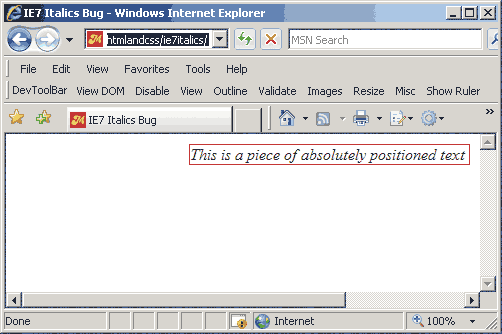
IE6 doesn’t have any problem with the same code which is interesting and suggests that this bug has been introduced into IE7.

I also noted that the same problem doesn’t exist when the page is rendered in quirksmode.

Figure 1: IE7 See the horizontal scrollbar.
screenshot showing horizontal scrollbars in IE7 caused by absolutely positioning italicized text

Figure 2: IE6 No problem

screenshot showing absolutely positioned italicized text

Post Tools

Comments: Add yours

1. On December 28th, 2006 at 5:35 pm Frances Berriman said:

That’s pretty interesting. I was marking up some quotes with italic cites and such just a couple weeks ago, and I was getting scroll bars. Can’t remember what I did now to get rid of them, so I’m not sure if it was the same bug, but I do remember scratching my head over it for a while. I’ll maybe play with what I had originally again and see if it is this!

2. On December 28th, 2006 at 9:16 pm Heliologue said:

I fully expect this to be fixed by IE8.

3. On December 29th, 2006 at 3:52 am kartooner said:

I remember seeing this when I was messing around with IE7 a few months ago. I’ve yet to figure out why all of a sudden version 7 does this, while version 6 does not? It’s obvious a tweak they made, maybe to fix something triggered this display bug.

It’s odd.

4. On December 29th, 2006 at 8:18 am zproxy said:

As a workaround you can add

p{
        overflow: auto;
}

This will most likely fix the problem :)

5. On December 29th, 2006 at 11:26 pm Stuart Colville said:

Thanks zproxy, that looks to be a suitable fix. I’ve added a test page with that here: http://muffinresearch.co.uk/code/xhtmlandcss/ie7italics/index3.html

Interestingly I found that zoom:1 also worked in this example but in my original page where the italic text was nested within a the div zoom:1 didn’t work. Thus I recommend using overflow:auto as zproxy suggested.

6. On December 31st, 2006 at 12:36 am Jen said:

Actually, a similar problem exists in IE6:
http://www.thescripts.com/forum/thread96080.html

I came across this a few months ago. It didn’t have anything to do with absolute positioning, at least not in my instance. I had a div that was float:right, and the text was italicized, giving a horizontal scrollbar. Very bizarre!

Interesting to see that the problem still exists in IE7…. not surprising though :(

7. On January 9th, 2007 at 3:05 am Max Design - standards based web design, development and training » Some links for light reading (9/1/07) said:

[...] Bug: IE7 absolutely positioned italics [...]

8. On January 11th, 2007 at 2:00 pm Scroll horitzontal al mesclar position: absolute i font-style: italic - a.css, esbudellant estàndards said:

[...] Font: Bug: IE7 absolutely positioned italics [...]

9. On January 11th, 2007 at 5:45 pm alberto said:

[...] Ya hemos empezado con los bug de explorer 7, en este caso lo ha descubierto muffinresearch y are lo ha solucionado (en catalán, eso sí ): [...]

10. On March 8th, 2007 at 12:37 am Cody said:

Was wondering what the hell the problem was for about 2 hours before I decided to search google and came up with your site..

I would have never have thought this would be a glitch in IE7..

THANK YOU!

11. On March 23rd, 2007 at 10:53 pm jordi said:

damn IE7!

all the afternoon trying to fix by myself this annoying thing until i thought, let’s search forums ;P

i used overflow: auto where is the font-style: italic and it got fixed! thanks guys!

jordi.

12. On April 4th, 2007 at 8:40 pm Gene Spesard said:

I just ran into a somewhat similar problem in that when I had a div of menu items floated left all the CSS and links disappeared when there were italics to the right of it. It didn’t matter if the italics came from CSS or a <i> tag. Adding the overflow: auto; fix to the class I was using for the italics text “fixed” it.

13. On April 25th, 2007 at 8:20 pm AndreyT said:

Strictly speaking, this has nothing to do with absolute positioning. It is a general big with italic text. Just try

Text

and you’ll get the same problem.
overflow: auto’ does indeed help as a workaround.

14. On May 2nd, 2007 at 3:30 am DonC said:

Oh MAN!!! I spent an entire DAY today trying to figure this one out! This is THE most bizarre thing I’ve ever seen.

My page had a bunch of text (from an xml document) in the middle column and two navigational columns, left and right (PHP includes). Any link lower on the page than the first italics in the center column would not work! Only in IE7, of course. The left and right columns were included BEFORE the middle column, so it really made no sense.

Inexplicably, the overflow:auto on the center column worked. Crazy.

15. On November 22nd, 2007 at 6:09 pm MMJ said:

I just discovered this bug, very interesting. It also applies to the <em> tag.

16. On February 28th, 2008 at 1:14 pm stephan said:

Stupid bug. It cost me an hour to find out what was the cause. Why doesn’t Microsoft repair it in one of the updates …?

17. On May 25th, 2008 at 5:35 pm Scroll horitzontal al mesclar position: absolute i font-style: italic - blog.esbudellat, esbudellant estàndards said:

[...] Font: Bug: IE7 absolutely positioned italics [...]

18. On June 4th, 2008 at 5:06 am Preeti Verma said:

Hi,
I m new to scripting language. i have a similar problem. In my page i have bunch of text and user defined shapes like triangle. When ever i increase Zoom shapes get enlarged but text position remains same. bacause of that text and shape get overlapped. I tried ur solution but nothing happended. Please suggest
Thanks in advance.

19. On January 5th, 2009 at 7:56 am Lokesh said:

I faced same problem but not due to italic, it was happening due to 100% width mentioned along min-width, something like that

#wrap{
width: 100%;
min-width: 770px;}

After, removing 100%, it’w working fine.

Thanks for your solutions also

20. On April 18th, 2009 at 1:35 am WEB 3.0 » Blog Archive » ¿Así que querías saber (casi todo) de CSS? said:

[...] Bug: IE7 Absolutely Positioned Italics - Stuart Colville [...]

21. On May 18th, 2009 at 7:34 pm Buddy said:

“I fully expect this to be fixed by IE8.”
Don’t hold your breath, Heliologue! And so what? The problem is here now and will be for some time. This bug seems to have many manifestations. And they are all Weird!

Long floated box on the left; text to the right using standard, unchanged paragraph tags - as soon as a line comes along with the tag, no more left column from that point!

overflow:auto (thanks zproxy) fixes the left box disappearance problem, but also eliminates the effect of the float, which now continues on as a column of white space to the end of the last paragraph that appeared next to the float. Subsequent paragraphs will align to the left column.

Does anyone have any idea what is affecting what in this bug? Solving one problem while creating another, unfortunately, still leaves a problem.

22. On May 18th, 2009 at 7:37 pm Buddy said:

OOps!

from the begining of the italicized text, the line should read “as soon as a line comes along with the <em$gt; tag,…

23. On May 20th, 2009 at 6:34 pm zproxy said:

Maybe IE9 will fix it? :)


XHTML: You can use these tags: <a href="" title=""> <abbr title=""> <acronym title=""> <b> <blockquote cite=""> <cite> <code> <del datetime=""> <em> <i> <q cite=""> <strike> <strong>


Ubuntu: Turn off changing workspace with mouse wheel|(0)

I found the changing with the workspace with the mouse wheel really annoying. To disable it go to System => Preferences => CompizConfig (available if the compizconfig-settings-manager package is installed) and uncheck “Viewport Switcher” which is under the “Desktop” heading.

Ubuntu: Mounting a TrueCrypt volume at startup or from the CLI|(0)

All you need is a mount point e.g: mkdir /media/ and then use the following: truecrypt /path/to/truecrypt/diskimage /media/. This is handy when you want to mount a truecrypt image at start-up or just do it quickly from a shell. It’s far more direct than using the GUI.

Photos on Flickr

© Copyright 2004-09 Stuart Colville, all rights reserved. May contain traces of Muffin. Powered by WordPress. Hosting by Slicehost.com This page was baked in 0.896s.